 Tessellation Software
Appearance
Server Services
In this section, we discuss and provide sample code in java of how to write your Service that executes within the TSF. For a more detailed description on how to configure your Services to run within the TSF and determine which TSF Instances (servers) these execute on, visit here.
Below is a HelloWorldService that simply responds to a synchronous message sent with a greeting. If a connected client sends a name to this Service, e.g., "John", it will receive back, e.g., "Hello John, Today is June 2, 2023 10:54:03.177".
(You may copy this code by clicking in the upper right corner.)
java
public class HelloWorldService implements ServiceCommandResponseCommunicator {

  @Override
  public void init(String reqOrReplyString,
                   String configFileFullPath,
                   UserConfig userConfig,
                   RequestResponseHandler requestResponseHandler)
      throws Exception {

  }


  @Override
  public void respondToCommand(RequestResponseHandler handlerWContextOfMsg,
                               TSFMessage msgPkg,
                               boolean secureConnUsedToTransmitMsgPkg,
                               String userNameOfConnectedClient,
                               String x509dNameOfConnectedClient,
                               String x509SerialNumOfConnectedClient) {
    String name = new String(msgPkg.getContent());
    String responseString = "Hello " + name + ", Today is: " + new Date();

    handlerWContextOfMsg.sendResponse(null, responseString.getBytes());
  }


  @Override
  public String commandToRespond() {
    return null;
  }


  @Override
  public void closeService() {

  }
}If this is a Service (vs. a Dynamic Service), a TSF Instance executing your Service will pre-instantiate one instance of this class for each connection that it is configured to handle. So, if a particular TSF Instance executing this Service allows for 100 incoming connections, 100 of instances of this Service class will be created -- one for each connection -- when the TSF Grid first starts up. These will be re-used throughout the time the TSF Grid remains up for new connections, so there is one of these dedicated to each ServerConnectionCmpnt where each ServerConnectionCmpnt is responsible for handling all traffic to and from a connected client.
If this is a Dynamic Service, a new instance of this class is instantiated by the ServerConnectionCmpnt when it receives a call to this Service and discarded after the response is sent.
So, there is one instance of your Service class for every simultaneous connection that your TSF Instance is configured to handle.
init method
For Services: This method is invoked only once -- when the TSF Grid first starts up and the instances of your Service are pre-instantiated. As there is one instance of your Service per connection, init() is invoked on every one of these Service instances when these are pre-instantiated.
For Dynamic Services: This method is invoked each time an instance of your Service class is created -- which is whenever a request comes into a TSF Instance for this Service.
The userConfig parameter has the path and filename from the "configFile" property you set up in your TSF Grid .json configuration file for this Service -- if you provided one. If one was provided, it is here, in this init() method, that you would read this file and store or act on these properties if needed.
Also passed, is a requestResponseHandler parameter. Though you will receive a different requestResponseHandler with every command/request sent to this Service in the "respondToCommand()" method covered below, this requestResponseHandler is not connected to any connected client. It can be used right away to make calls on other Services executing within the TSF where required for this Service to start. It may also be stored in a member variable for use in sending commands to other Services that, whether tied to the action of a connected client or not, will/may outlive that particular client connection and that may continue to execute even after that particular client is disconnected.
Neither of the above parameters are used in the simple example above and our init() method is implemented empty.
Important design pattern: We will see in later, more complex examples, this init() method will often use a singleton pattern so that just one of the many instances of your Service create a single class that all of the instances of this class created by your Service have access to. In this way, state that may be changed or accessed by any client connected to your Service is kept/updated/accessed in this one central instance of your Service singleton class (via calls from this Service class that is one-per-connection), whereas state for connected client code (i.e., for a particular connection or end user) would be kept in member variables of this Service class that you have written.
respondToCommand
This method is invoked every time a command comes into this particular connection (ServerConnectionCmpnt) from a connected client.
In fact, to implement the above example Service -- enabling, potentially, hundreds of people to connect and receive generated responses that are formed and sent concurrently -- we only had to write 3 lines of code:
--The first line reads the name from the MsgPackage passed (see below).
--The second line constructs the response. (This is the business logic of your Service.)
--The third line uses the RequestResponseHandler to send a response (see below).
Notice that no development work needed to occur to be able to communicate (securely if this is a secure connection) with a remote connected client; nor was any work expended to handle dozens of simultaneous connections or to write any communication code related to any of this communication and (secure) connectivity.
MsgPackage msgPkg parameter:
MsgPackage has two methods of immediate interest:
🔹 String getRequestOrReply() and
🔹 byte [] getContent()
The sample Service above expects that the name (e.g., "John") be passed as a set of bytes in the content payload of the MsgPackage. (I.e., the client code used the method of the TSF's client component (SuperMainClientCmpnt):sendSyncMsg(String serviceAndOptionalAdditionalInfo, byte [] content)
as follows: sendSyncMsg("HelloWorldService", personName.getBytes());
where String personName had the value "John" prior to the call. If this Service expected the person's name as part of the String serviceAndOptionalAdditionalInfo, it would have made the following call instead:sendSyncMsg("HelloWorldService" + ":" + personName, null);
and the Service would have had to split() the String at the ':' to obtain the name. When a client invokes the TSF Client Component's sendSyncMsg() or sendAsyncMsg(), the first element of the String serviceAndAddlitionalInfo parameter must be the name of the Service to which the request is directed. Any additional information has to follow a ':' after the name of the target Service. So, often the request itself is sent in the byte [] content.
RequestResponseHandler handlerWContextOfMsg parameter:
This is used by your Service to send responses back to the client code that sent the command/request. Simply use its:sendResponse(String requestOrReply, byte [] content)
method to send your response back to the connected client.
Note that whether the client sends a sync or async msg to the above Service, the Service code on the server (as shown above) doesn't change:
🔹 Click here to see how to create client code that sends a synchronous message to the above Service
🔹 Click here to see how to create client code that sends an asynchronous message to the above Service
General Inforamtion (prior to more complex examples)
You can also, as part of executing your business logic within your Service use other RequestResponseHandler methods to send requests to other Services executing on the TSF Grid and receive responses from these.
A client can connect to any instance on your TSF Grid and send a request to any Service executing within the grid (whether or not the requested Service is executing on the TSF Instance the client code has connected to). The TSF will route the request to the "least expensive" TSF Instance (from a NetworkModel perspective) executing the Service to fulfill the request if that Service is not executing on the connected-to TSF Instance.
A client may send a request to any Service synchronously or asynchronously using the TSF Client Cmpnt's sendSyncMsg() or sendAsyncMsg() as mentioned previously. In fact, all requests/responses are sent asynchronously with the sendSyncMsg() method simply simulating a synchronous request-reply by creating an object to receive the response and synchronizing and wait()ing on that object until it is filled by the TSF Client Cmpnt when said TSF Client Cmpnt receives the response for this synchronous message sent and then fills said object with the response and synchronizing and notify on said object that was created just to receive and hold the response, thus freeing the thread that invoked sendSyncMsg() to pick up the response and continue processing. An optional wait time may be specifies so that client thread does not wait forever if a response never is returned.
As we will see in the coming examples, there is also the concept of sending a request either synchronously or asynchronously and having a multiple determined number of responses come back as a result of that request. An example of this is if your Service was a cache or database or if a report is generated and the Service determines, e.g., that 703 responses will be sent back as a result of that request. Finally, there is a capability of sending a subscribe() command to a Service where the number of responses is not known and is potentially unlimited (until an unsubscribe() is sent).
Multi-response examples
Now, we move on to examples where the Service you develop will send a number of responses that it will determine based on the request received. As mentioned, this is what would occur if a database query were issued and the server determined the number of rows that would be returned; or, if a report were executed and the number of results were determined by the server after the report was produced.
To simulate this situation, we change our HelloWorldService to greet the person requesting the greeting a random number of times (between 1 and 10). The server will generate the number of responses and that many greetings will be sent to the person who requested the greeting. So, the server code will change in the following manner: (Only showing the updated respondToCommand() method and the creation of the RandomGenerator it uses.)
java
private static final Random sRandom = new Random();
  . . .
  @Override
  public void respondToCommand(RequestResponseHandler handlerWContextOfMsg,
                               TSFMessage msgPkg,
                               boolean secureConnUsedToTransmitMsgPkg,
                               String userNameOfConnectedClient,
                               String x509dNameOfConnectedClient,
                               String x509SerialNumOfConnectedClient) {
    String name = new String(msgPkg.getContent());
    String responseString;
    int numResponses = sRandom(10) + 1; // 1 to 10
    // Send multiple responses
    for (int responseId = 1; responseId <= numOResponses; responseId++) {
      responseString = "Hello " + name + ” (Greeting #" + responseId + ” of “+ numResponses +
                       ”)…Today is: “ + new Date();
      handlerWContextOfMsg.sendResponse(null, responseString.getBytes(), responseId, numResponses);
    }
}Note that the server must receive a MsgPackage from client code using the form of sendSyncMsg() or sendAsyncMsg() that requires a multi-response (which is not to say that more than one response is guaranteed to be sent back -- only that more than one response might be sent back).
Note that whether the client sends a sync or async msg to the above Service, the Service code on the server (as shown above) doesn't change:
🔹 Click here to see how to create client code that sends a synchronous message to the above Service to receive possibly multiple responses.
🔹 Click here to see how to create client code that sends an asynchronous message to the above Service to receive possibly multiple responses.
Only then will the form of sendResponse() shown in line 17 on the RequestResponseHandler passed in be able to be invoked with the form that requires total number of responses to be sent back. Said total number of responses must be sent with every sendResponse() invocation -- in part because the client might receive or process these sent responses out of order and has to "know" when it has received every response it is going to ultimately sent or not each time said client code processes said response.
Realistic Examples: Server keeps state
The following server code is written in the manner that most Services will be written -- where there is both state specific to the client code connected (session state), but also overall state that "survives the connection" (service state).
We will follow the following design pattern as discussed prior: The init() method will use a singleton pattern so that just one of the many instances of your Service create a single class that all of the instances of this class created by your Service have access to. Recall that the init() method is called once -- on every instance of your Service where said instances are created on TSF Grid startup (one for every connection that may be handled concurrently). Rather than call our class that runs within the TSF HelloWorldService, we will now, more accurately, call our class HelloServiceConnector and we will call the singleton that one of the HelloServiceConnectors will create in its init() method Hello Service. This is shown in the image below:
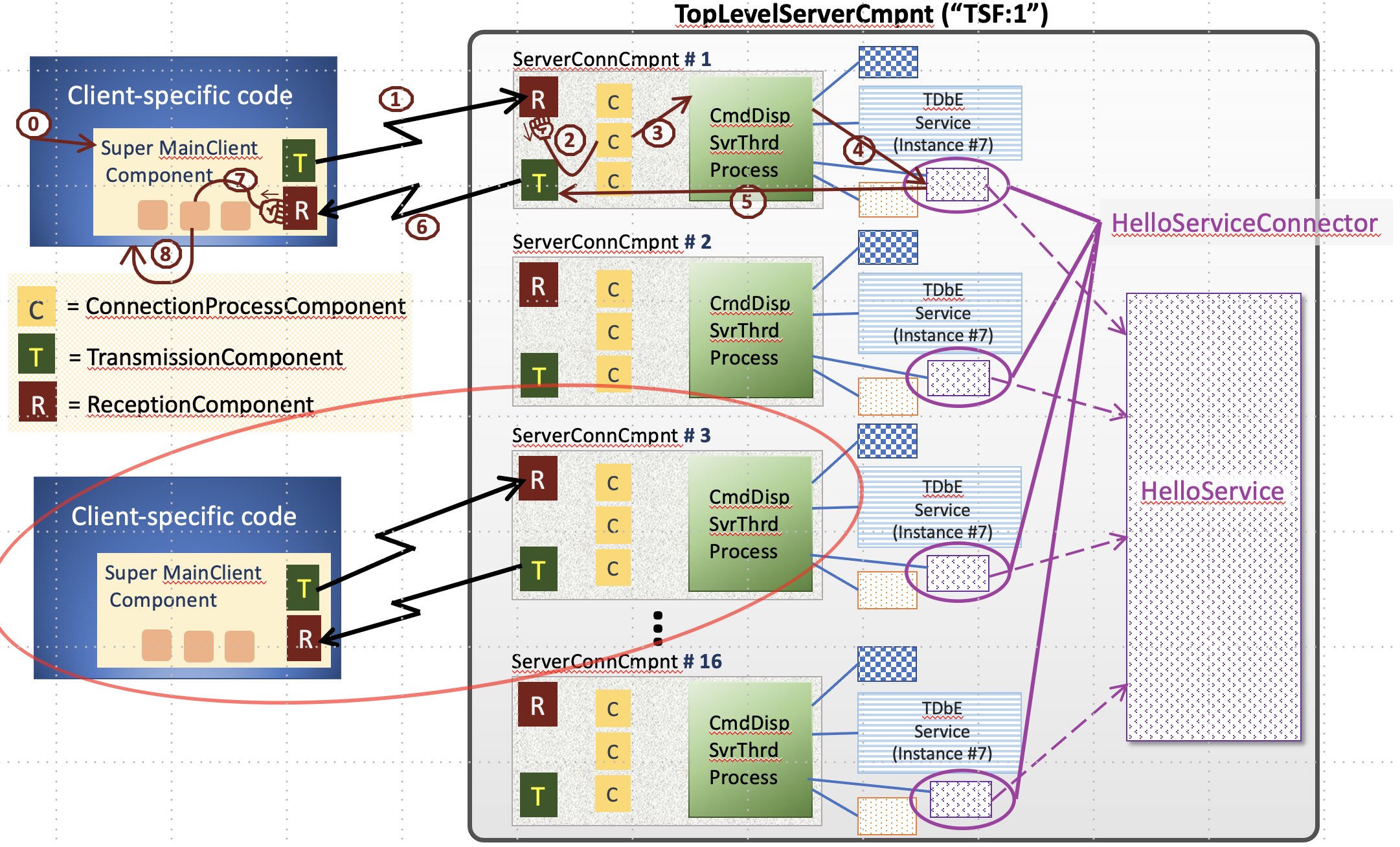 Only one of the
 init() calls of the 16 HelloServiceConnector instances will create HelloService and the rest of the HelloServiceConnector instances will reference the single HelloService.
HelloServiceConnector will keep session state. It is this class that implements ServiceCommandResponseCommunicator and be mentioned in the TSF Grid .json file as a Service executing within the TSF.
HelloService will keep service state. State that may be changed or accessed by any client connected to your Service is kept/updated/accessed in this one central instance of your Service singleton class (via calls from this Service class that is one-per-connection), whereas state for connected client code (i.e., for a particular connection or end user) would be kept in member variables of this Service class that you have written.
The capabilities we add to our (now HelloServiceConnector) are shown in the image below: 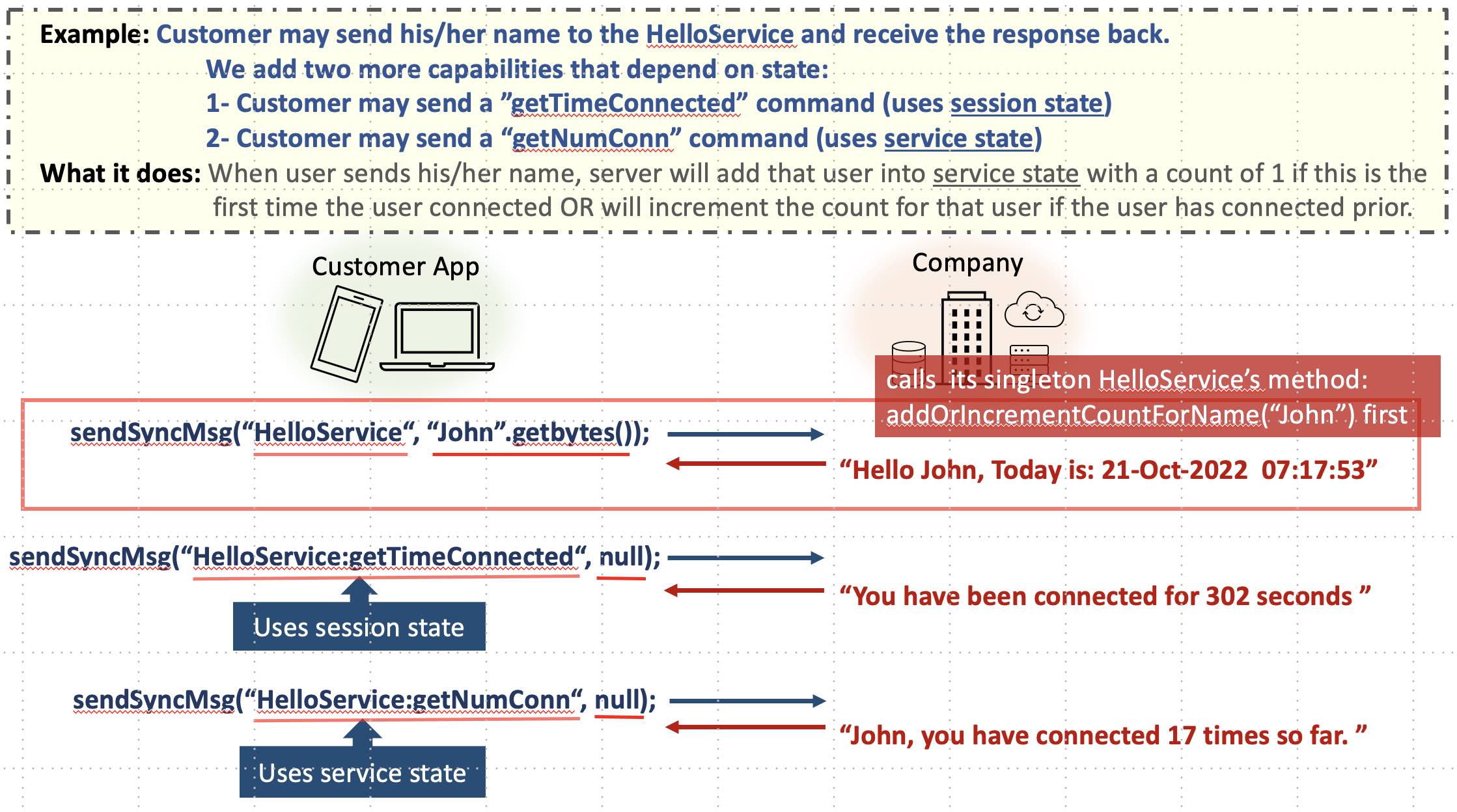 To realize our example, the only way we can determine how many times a particular person (e.g., "John") has connected is to keep that count centrally. (After all, "John" may connect for a greeting many times over a number of weeks and may connect to different
 ServerConnectionCmpnts each time [see image of TSF Instance above]. The HelloServiceConnector that has been pre-created for each ServerConnectionCmpnt can not, therefore, keep this service state. It must be kept in HelloService.)
However, to keep the session state of how long, e.g., "John" has been connected in this session, where, given these new capabilities, he can request that information multiple times during the session -- this session state (of timeOfConnection) is kept in that ServerConnectionCmnpt's HelloServiceConnector -- the Service we created to run in the TSF.
Here is the code for our singleton HelloService:
java
public class HelloService {   // Ignoring race conditions.
    private HashMap<String, Integer> mNameToNumTimesConnected = new HashMap();

    public void addOrIncrementCountForName(String name) {
        Integer count = mNameToNumTimesConnected.get(name);
        if (count == null)
            mNameToNumTimesConnected.put(name, 1);
        else
            mNameToNumTimesConnected.put(name, count + 1);
    }

    public int getCountForName(String name) {
        return mNameToNumTimesConnected.get(name);
    }
}HelloService keeps a HashMap of names and the number of times that name has connected since the grid has come up.
Here is the code for our HelloServiceConnector:
java
public class HelloServiceConnector implements ServiceCommandResponseCommunicator {
private static HelloService sHelloService; // Accessible/modifiable by every instance.
private long mStartTimeThisConn; // Accessible/modifiable only by current connection.
private String mName; // Accessible/modifiable only by current connection.
@Override
public boolean afterConnect(...) {
mStartTimeThisConn = System.currentTimeMillis();
mName = null;
return true;
}
@Override
public void init(String reqOrReplyString, String configFileFullPath, UserConfig userConfig,
RequestResponseHandler requestResponseHandler) throws Exception {
if (sHelloService == null) {
synchronized (this.getClass()) {
if (sHelloService == null)
sHelloService = new HelloService();
}
}
}
@Override
public void respondToCommand(RequestResponseHandler handlerWContextOfMsg,
TSFMessage msgPkg,
boolean secureConnUsedToTransmitMsgPkg,
String userNameOfConnectedClient,
String x509dNameOfConnectedClient,
String x509SerialNumOfConnectedClient) {
String request = msgPkg.getRequestOrReply(); // NEW! request is SvcName:request
int locationOfColon = request.indexOf(‘:’); // -1 if ‘:’ not present – if not present, there is no
// request, and it is assumed Name is passed
// in msgPkg.getContent().
request = ((locationOfColon == -1) ? “SetName” : request.substring(locationOfColon));
String responseString;
if (request.equals(“SetName”) {
if (mName == null) {
mName = new String(msgPkg.getContent());
sHelloService.addOrIncrementCountForName(mName);
responseString = "Hello " + mName + ", Today is: " + new Date();
} else {
responseString = ”Name already set for this connection...Reset not allowed...";
}
} else if (request.equals(“getTimeConnected”) {
responseString = ”You have been connected for " +
((System.currentTimeMillis() - mStartTimeThisConn) / 1000) + ” seconds ”;
} else if (request.equals(“getNumConn”) {
if (mName != null) {
responseString = mName + ”, you have connected " +
sHelloService.getCountForName(mName) + ” times so far.”;
} else {
responseString = ”Your name must be sent before sending this request…”;
}
} else {
responseString = ”Error: Unrecognized request sent to the server…” ;
}
handlerWContextOfMsg.sendResponse(null, responseString.getBytes());
} // End: respondToCommand( ... ) method
}You can see in the init() method how the singleton HelloService is either created or how a reference is obtained to the HelloService that was created by a different instance of this HelloServiceConnector.
We introduce a new method that our TSF provides: afterConnect()afterConnect() is invoked every time a new connection is assigned to the ServerConnectionCmpnt (unlike init() which is only invoked once). It enables you to:
--Clear state between connections (also important so that one end user/connected client doesn't encounter the prior connection's data).
--Set and initialize state and variables (as we are doing here when we store this user's time of connecting).
You can see how respondToCommand() in line 44 invokes the singleton HelloService's addOrIncrementCountForName() (prior to sending the initial greeting when, e.g., "John" sends this Service his name) causing this entry in HelloService's HashMap for "John" to be newly created with a count of 1 or incremented if already there.
You can see how this central service state is accessed when respondToCommand() is invoked with "HelloServiceConnector:getNumConn" in line 55.
Finally, you can see how the session state is accessed in line 51 when "HelloServiceConnector:getTimeConnected" is sent by connected client.